
Product · Excel reporting
Every company, every ERP, every currency, in your own Excel templates: current to the last few seconds, with drill-down to every transaction.
Book a walkthroughTry the live report
By Mark Richardson FCCA, founder and CEO of Mondial
Most people experience Mondial through its Excel add-in. You keep the Excel reports your team already knows and insert Mondial formulas into their cells, so every figure comes live from Mondial. Click any figure to drill down to the transactions behind it. What makes the numbers different is what sits behind them: every company and every ERP in the group, aligned to one chart of accounts, in any currency and under any GAAP, with an auditable period-end close.
This is a real consolidated report built in Excel on Mondial data. Hover over any figure, or tap it on a phone, to see the in-line drill-down: the accounts that make up the balance, totalling back to the figure.
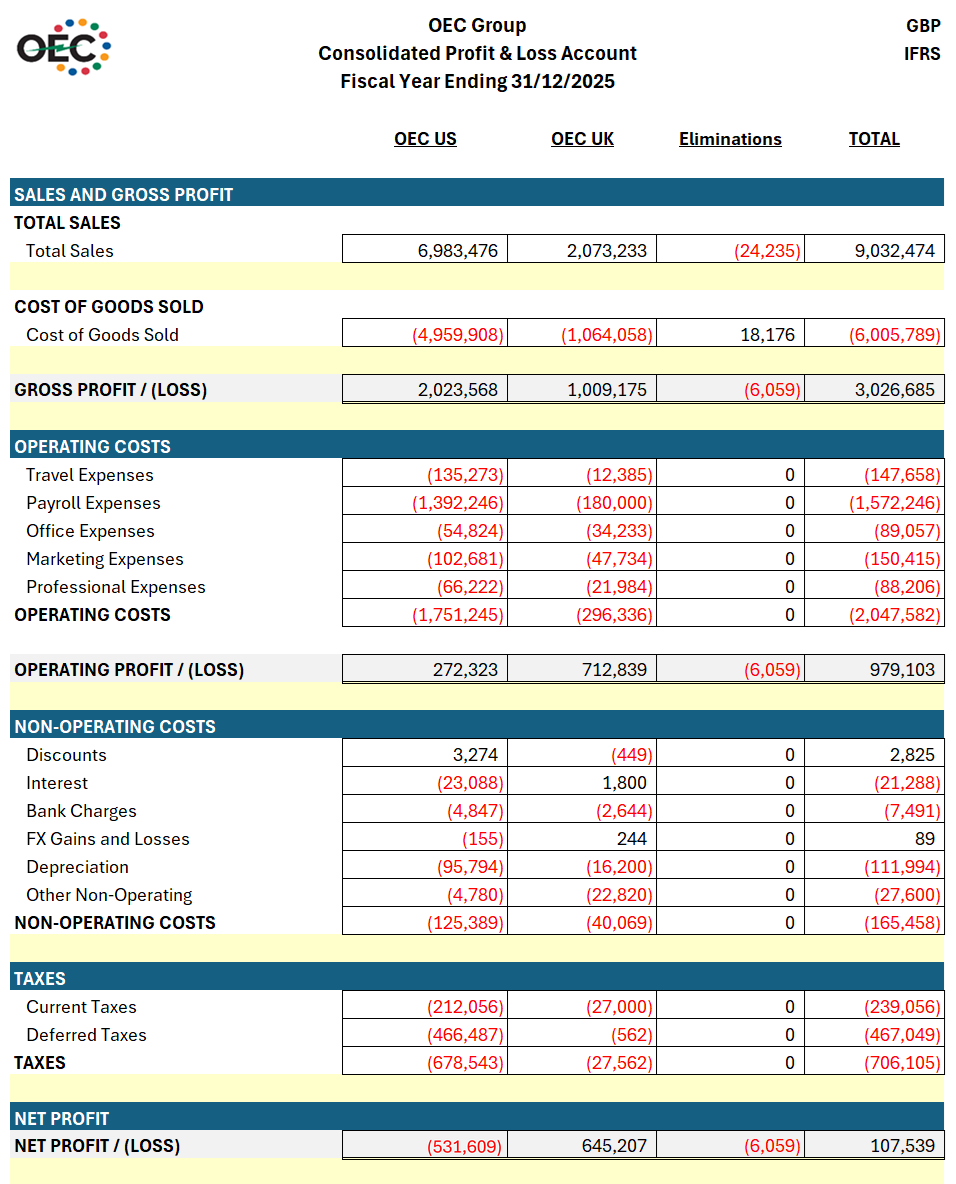
Scroll the report and hover over any figure to see Mondial's in-line drill-down: the accounts behind each balance, right inside Excel.
An Excel report is only as good as the data behind it. Behind every Mondial figure is a complete period-end close:
For every capability, see What Mondial does, or the guide for your ERP.
Reporting straight from a single ERP into Excel works well for a simple, standalone company. This is where Mondial goes further.
| Need | Reporting from one ERP | With Mondial |
|---|---|---|
| Companies | One ERP database at a time | Every company and every ERP in one report |
| Chart of accounts | The ERP's own account codes | One mapped group chart, plus statutory charts |
| Currencies | The currencies the ERP holds | Any reporting currency, with the CTA calculated |
| Adjustments | Posted in the ERP, or kept in the spreadsheet | Separate ledgers with an audit trail, never posted to the ERP |
| Detail | Whatever the ERP and its connector expose | Every transaction with its line items, down to each AR and AP invoice line, with dimensions |
| When the business changes | Reports tied to the ERP's codes need rework after an acquisition or an ERP change | Reports keep working: new companies and systems are mapped in |
| Who can view and drill down | Report viewers may need access to the ERP | A Mondial license only, including read-only report users |
Every user needs only a Mondial license. Power users work in Mondial and build reports; read-only report users simply view the output. Every user can drill down, and because the drill-down goes to the data held in Mondial, nobody needs an ERP license to see the transactions behind a figure.
Just one company? The same Excel reporting works for a single company, and grows with you when a second company, currency or ERP arrives. Download a product guide or book a walkthrough.
RECARO Automotive, a manufacturer with operations in the United States, Germany and Japan, closes its books about four days faster on average with Mondial.
Current to the last few seconds. Mondial picks up new transactions from your ERPs every few seconds. Your workbook refreshes when it opens, and whenever you choose once it is open, so a new transaction can be in your report within seconds. A drill-down opens Mondial on live data.
No. Every user needs only a Mondial license: power users who work in Mondial, or read-only report users who simply view the output. Every user can drill down, and the drill-down goes to the data held in Mondial, so no ERP license is needed.
Yes. You insert Mondial formulas into the cells of your existing templates, and the layout, formatting and formulas you rely on stay as they are.
Yes, that is what it is built for. Every company's data, from every ERP, is mapped to one group chart of accounts, so one report covers the whole group, in any reporting currency and under any GAAP.
They keep working. Reports are built on Mondial's mapped chart of accounts, not on an ERP's account codes, so a new company or a new ERP is mapped in, and history from the old system stays alongside the new.
Yes. The same Excel reporting works for a single company, and it grows with you when a second company, currency or ERP arrives.
No. Mondial reads from your ERP and never posts back to it. Adjustments are kept in Mondial's own ledgers, with an audit trail.
Mark Richardson meets every new prospective customer personally. A 30-minute video walkthrough, using your own Excel reports.